Split Page
$79
BuySplit Page runs on a Mac with Apple silicon or Intel. There is currently no version for Windows, iPhone or iPad.
You pay once, without an account. And updates are included forever at no extra cost.
Read the manualTwo-column AV scripts
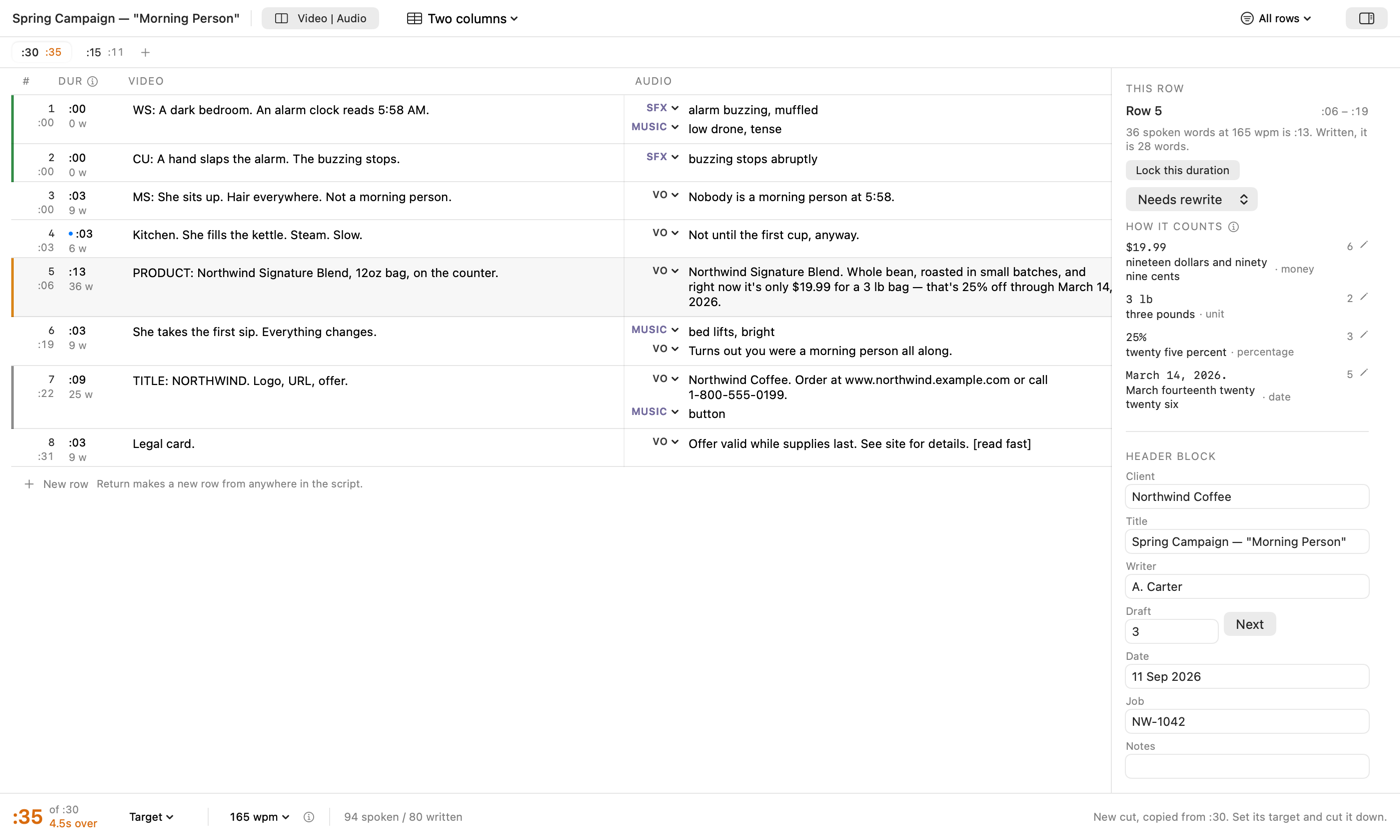
Video goes on the left and audio on the right, row by row, which is how scripts for commercials and corporate video are written.
It estimates the script’s running time while you type. $19.99 counts as six spoken words, nineteen dollars and ninety nine cents, where a plain word count makes it one, and March 14, 2026 counts as five. The clock at the bottom runs against the spot length you set.
It exports a .docx that holds the script as a two-column table.
It keeps the files few and easy to find. Every cut of a job lives in one file. A new script files itself in a Split Page folder in your Documents, named after the title you give it, and the name follows the title until you rename the file yourself. Open Recent brings back the scripts you have been working on.
What it does not do
Split Page has no live shared editing, comments or approval routing, because those need a server. It is built so a team does not need one. One file carries the whole job: every cut, every saved draft, and each row’s status, from approved to needs rewrite.
Snapshot a draft before the script goes round. When it comes back, compare it with that snapshot and every row that was added, removed, changed or moved is marked, and any saved draft can be restored.
The timing is an estimate.
What it is
- FormatTwo-column video and audio, row by row.
- TimesLive, at a words-per-minute you set, against a target length.
- CountsMoney, dates, units, numbers and abbreviations, as spoken.
- WritesDOCX, PDF and plain text. The DOCX holds the script as a table.
- CutsA :30 and the :15 cut down from it live in one file, sharing client, title and job number.
- DraftsSaved inside the file, compared row by row with the one you have now, and restored when you need it.
- NetworkOnce a day it asks oddlots.shop whether a newer version exists, and a switch in Settings turns that off. Help › Check for Updates asks whenever you choose. The request names neither you nor the version you have, and nothing downloads until you choose to install.
- NeedsA Mac with Apple silicon or Intel. Tested on macOS 26.
Every tool is sold under the terms set out in Principles & Terms.