Onionskin
$49
BuyOnionskin runs on a Mac with Apple silicon or Intel. There is currently no version for Windows, iPhone or iPad.
You pay once, without an account. And updates are included forever at no extra cost.
Read the manualScript watermarking for Mac
Onionskin puts a different mark on every copy of a script you send out. By default, each copy carries a short code and the name it went to.
If a page turns up somewhere it should not have, type in whatever part of its footer code you can read, and Onionskin tells you which copy it was and who received it. That works only if the record of runs was on when the copies were made, and it is on unless you turn it off. If you have the leaked PDF itself and nobody has altered it, you can drop the file in instead.
It is a deterrent and a tracing aid. It does not stop a script being photographed, retyped or leaked, and a determined person can remove a watermark.
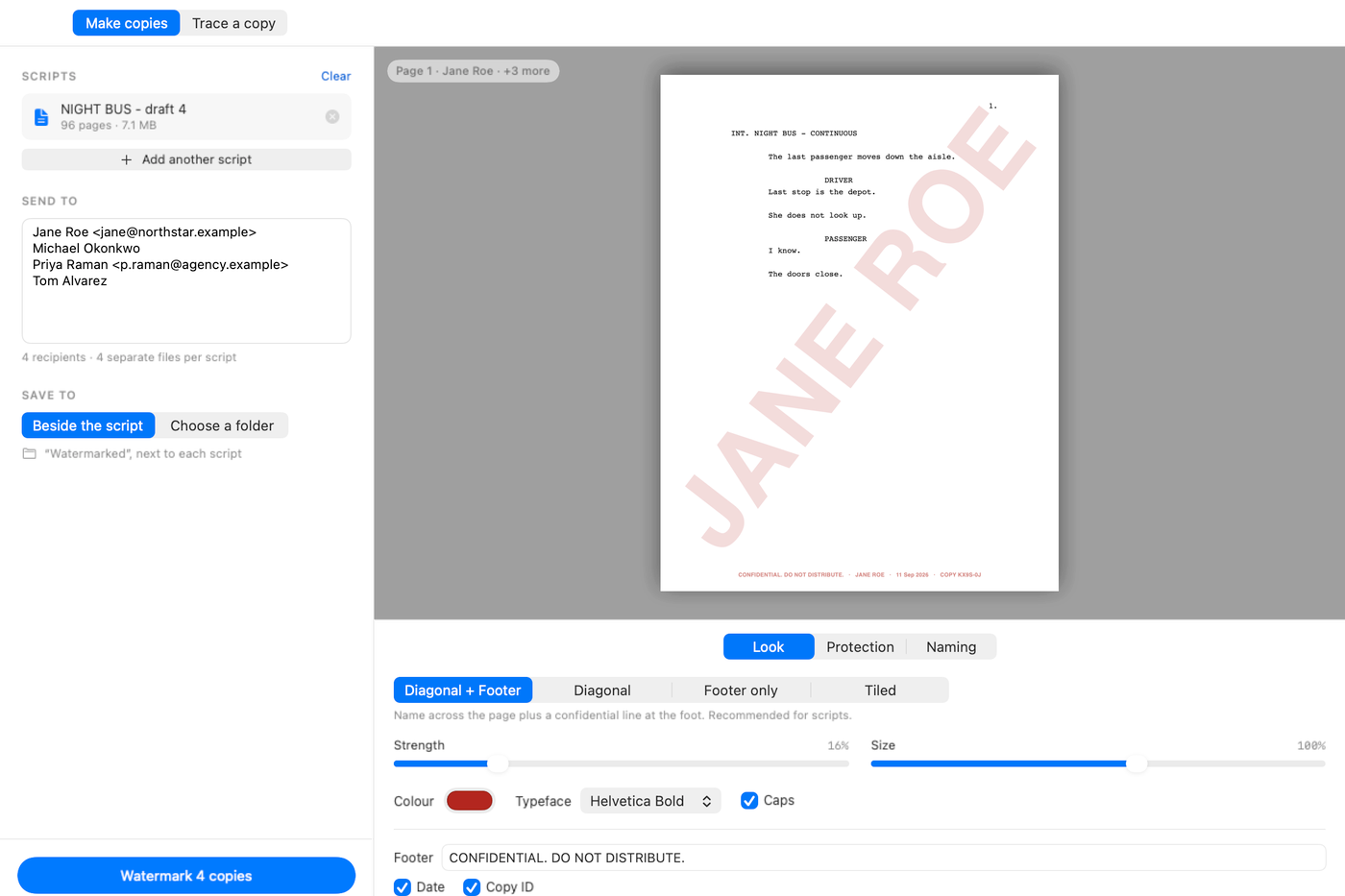
The mark
Four styles: diagonal and footer, diagonal only, footer only, tiled. The diagonal is the recipient’s name across each page. The footer is one discreet line carrying your confidential notice, the name, the date, and a copy ID.
The copy ID is worked out from the script’s file name, the recipient and the date.
Strength, size, colour, typeface and caps are adjustable, with a live preview of page one.
The protection settings
Flatten pages to images, on by default, renders each page and its mark into a single image. No text object is left in the file, so the mark cannot be selected and deleted, and there is no text layer to copy the script out of. The trade-off is that output is no longer text-searchable and files get bigger.
Ask readers not to print or copy, on by default, sets the PDF’s permission flags. Some readers honour those flags and some ignore them, and anyone who wants to can strip them, so it raises the effort and prevents nothing. The file still opens without a password.
Require a password to open encrypts each copy with AES-128, so the file does not open without the password. How well that works depends on how the password reaches the recipient, and it should not travel in the same email as the script. Neither the password nor the switch is stored, so you set both fresh each time.
What it is
- ReadsPDF. Images, if you have pages as images.
- WritesOne PDF per recipient, named for the recipient.
- MarkingFlattened into the page by default, with no text layer left in the file.
- TracingA partial code, or the leaked PDF if nobody has altered it.
- NetworkOnce a day it asks oddlots.shop whether a newer version exists, and a switch in Settings turns that off. Help › Check for Updates asks whenever you choose. The request names neither you nor the version you have, and nothing downloads until you choose to install.
- NeedsA Mac with Apple silicon or Intel. Tested on macOS 26.
Every tool is sold under the terms set out in Principles & Terms.